← Back
Integration and E2E testing with React, GraphQL, Node and Mongo, and mocking the time
See it on medium ...Someone asked me why I write so many integration tests. Well, beside it being a mandatory practice, to reduce my level of anxiety when I go to production.
Testing is an important part of a software engineer job. If we don’t include automated testing in our work then we would rely only on manual testing, on human capabilities, and human sometimes make errors.
Especially if you are a start-up and cannot afford a team of manual testers, having automated tests written garanties the maintenance of your existing features, if you start adding new ones, or simply leave the app on the hands of a junior engineer.
So we have 3 types of tests: unit, integration and e2e.
Unit tests
Unit tests, are the basic ones, testing a function, no need for mocking APIs. You have a function like the one bellow, that tells you if a parameter date is today, or in the past or future. This is a simple unit tests. But will the tests be right tomorrow?
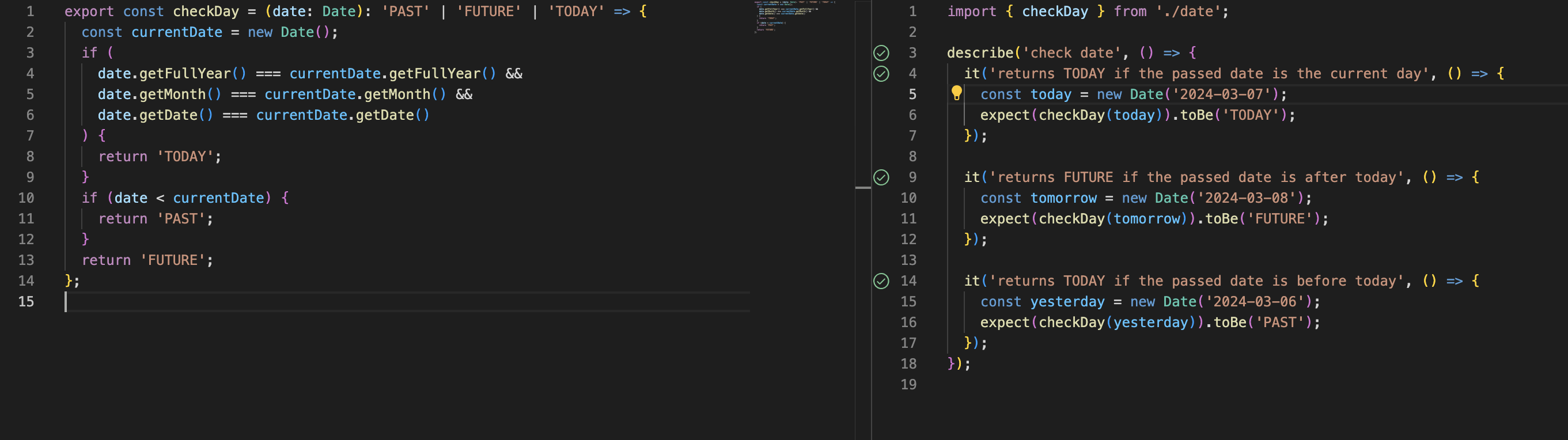
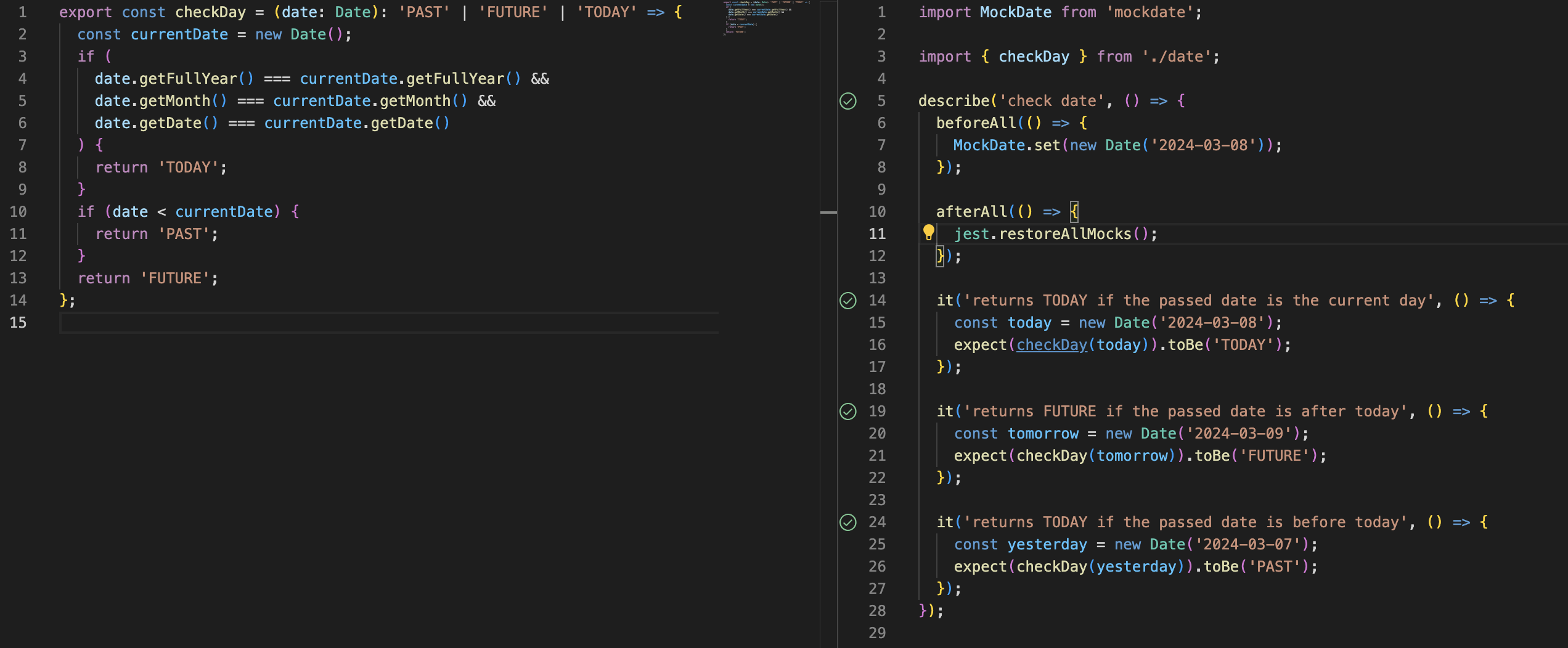
Well …, no. Since the system time will be different tomorrow, so the first two tests will fail. Let’s mock the date, and for this I found a very easy to use library mockdate. So yes, now if we run the test on the 8, 9 of march, or whenever, the test will be accurate.
Integration and E2E tests
Let’s move on to integration and E2E difference. Because many people confuse them. Integration tests a module of the application (on the frontend or on the backend) while the E2E tests an entire flow from filling a form in the user interface, clicking submit, and being saved correctly in the database (from the frontend to the backend). Usually E2E tests are done by automation tool, which cost money, and for a company at the beginning of the road, that may not be ideal. Now, depending on the complexity of the project, the company should decide if to invest in E2E testing.
Let’s take an example, I have a signup flow, user completes a form, press submit, a validation is performed, the request is made to the backend, in case of success a verification email is sent to the costumer, or an error is returned.
The following would be the steps for an E2E test for the signup module:- user completes the form
- submits the form it successfully
- user sees a successful message
- expect in the database to be created an user with his credentials
- expect in the user inbox to have an email of verification
Other E2E test would be:
- user completes the form with an existing email address in the system
- submits the form
- user sees an error message with the text an account with this email already exists
- nothing was added to the database
That would be great! But, if done right and with test coverage 100%, depending on the complexity of the app, integration tests can be enough.
Let’s start with the backend endpoint. Since we are using graphql, if the input is invalid, we will get a validation error way before reaching this function (also a type one from typescript).
So the signup function can do 3 things, throw an error if the password and passwordConfirm mismatch, throw an error if the email already exists, or create the user and call the function to send the verification email to him.
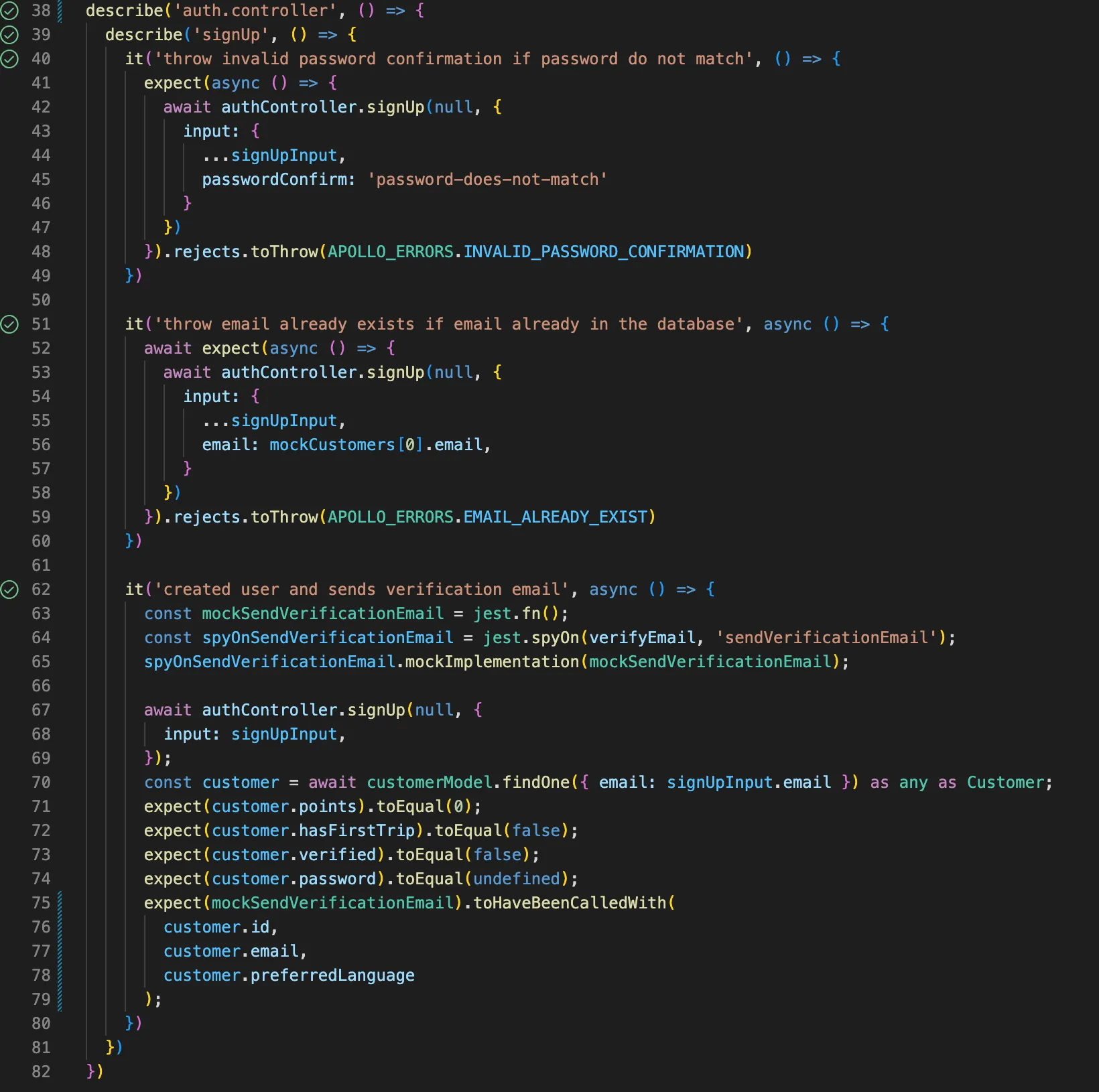
Ohh that wasn’t so hard! It seems kind of classy also. So the first case, I sent a passwordConfirm field mismatching the password and since the function throws an error, you can handle that expecting to reject with a thrown error.
In the second case, things get trickier. I have to mock my database. Here you can use mongodb-memory-server.
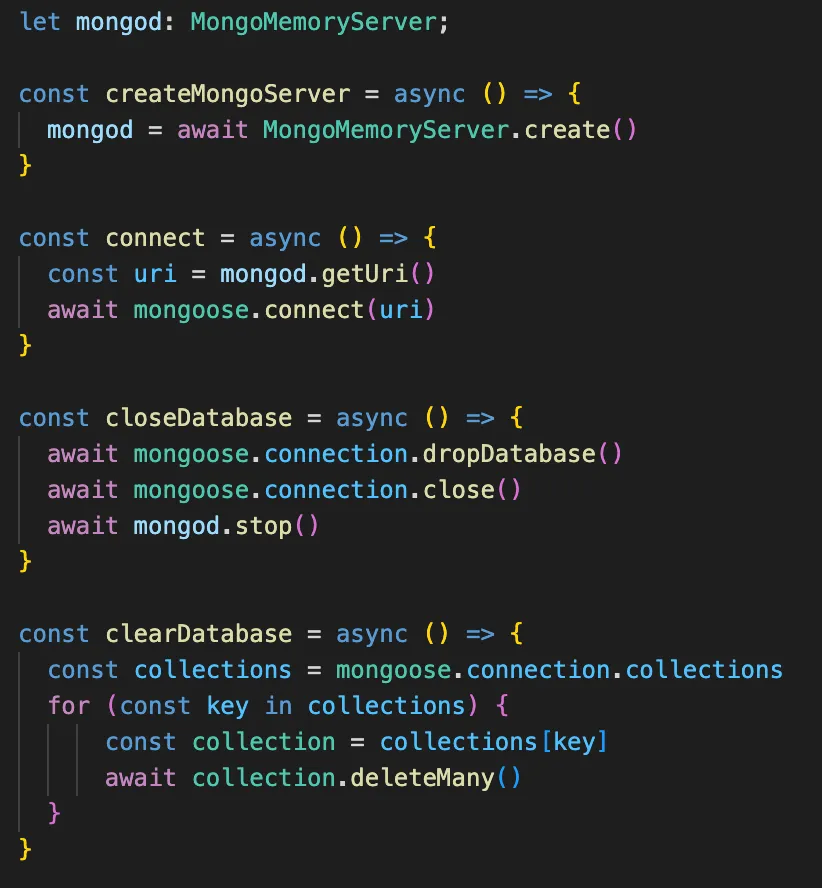
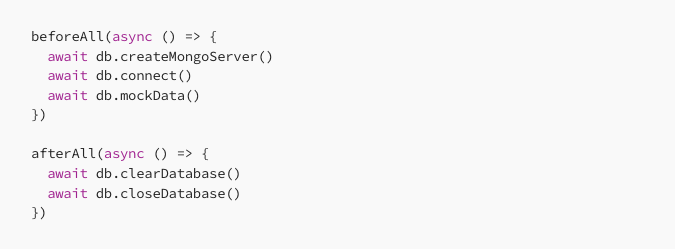
Here you can choose were it is best to do all these operations, if you need the clean database after each test of not. So… after mocking my database, it’s pretty easy to check if there is already a record with that email in the database.
For the third scenario, after my signup is called I am checking if it calls the send email function with the desired params. One of the integration testing patterns that I practice is the black box. Meaning another module of the application once it has been tested it’s considered a black box and I don’t need to test it in another place. This can be very useful especially if it is not straight forward like here. I would have to check if the nodemailer is set correctly, handle all scenarios. I don’t need to be doing that here, integration tests for sending emails will cover that scenario. I need to know that my black box is called correctly. And my job here is done.
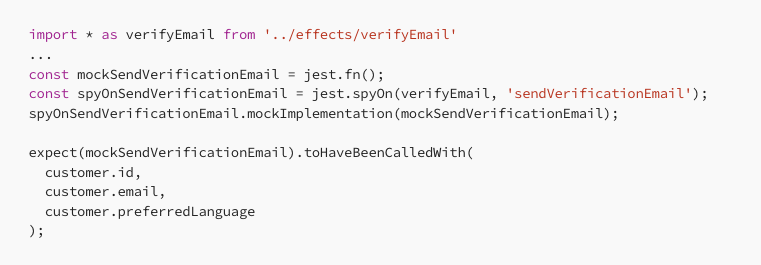
This was straighforward, now let’s go back to the frontend. We will use @testing-library/react. Let’s go ahead, write the snapshots, looking that everything is displayed correctly by data-testId (You don’t need me for this).
Hmm, what do you do if your component should be wrapped inside a Context? And many other components that will be tested. We can wrap the original render method in many many decorators providing us the proper context.
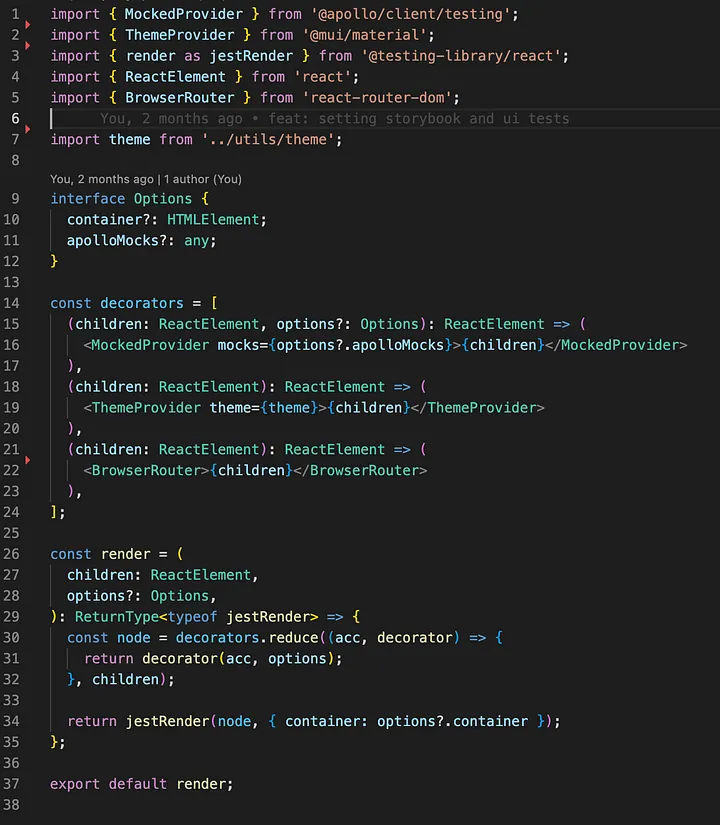
In our signup component we want to test how it behaves when receiving the posible response from the backend (the 3 scenarios that we saw when we tested the endpoint). For this we can mock our apollo provider. It’s part of @apollo/client so we don’t need something extra. We just need to add it to our decorators list that will wrap our component and receive the apolloMocks that we will provide when testing the component. Pretty simple, let’s see!
So, lets create the array with the mocks provided to our fake apollo client. Each object will tell that for this query and this set of variables mock the result or error like this. You see here that I’ve differentiated the inputs by the email.
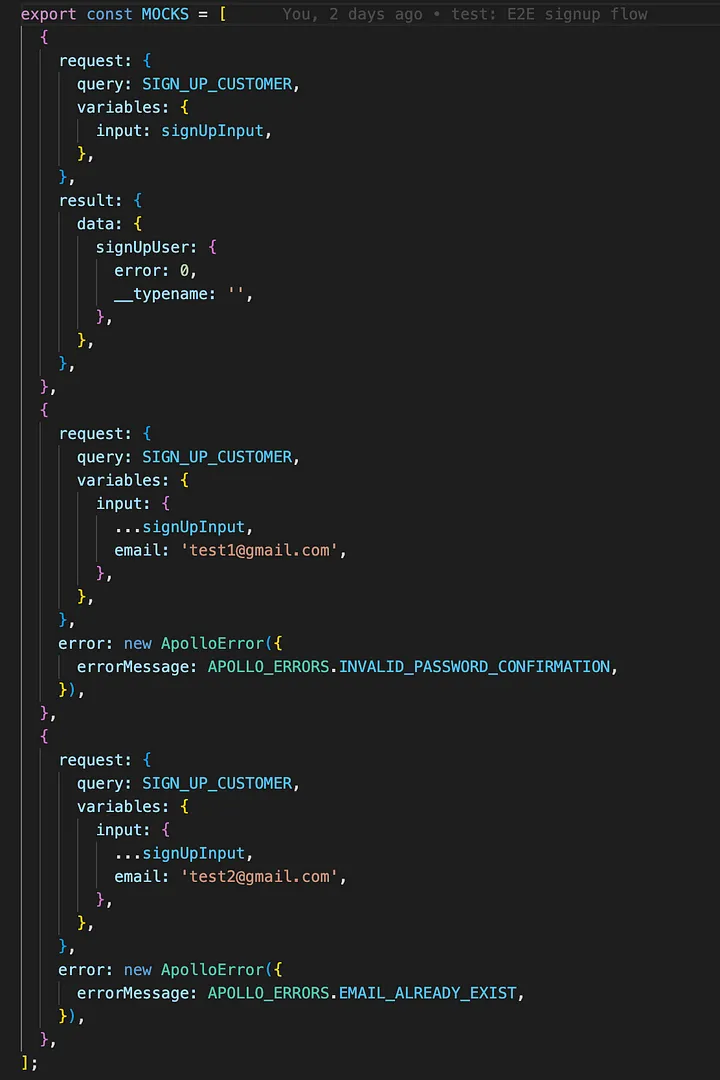
So after I render my component:
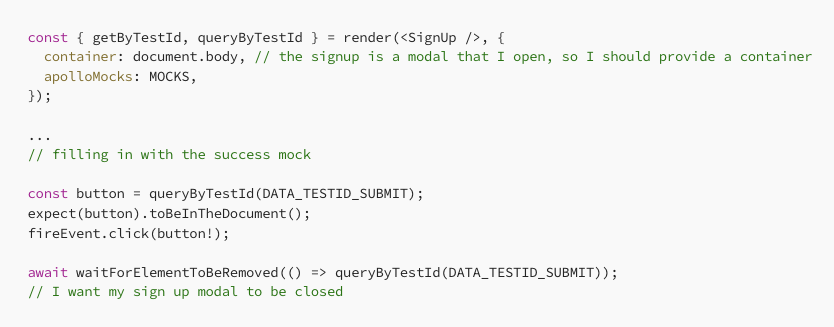
Waaw! Great news it worked!
What about an error?
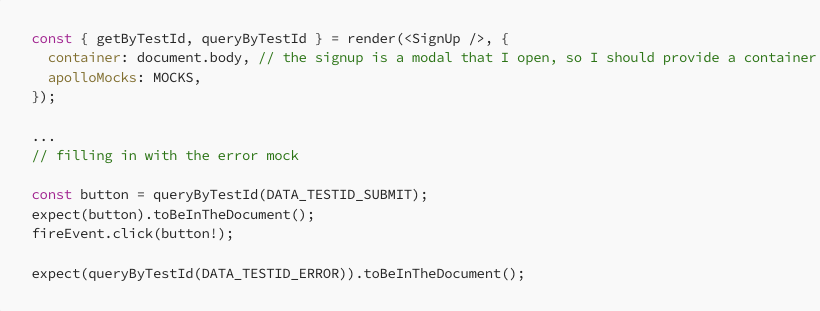
Aaaaand fail! Why isn’t in the document? I was going crazy.
The documentation says:
To test how your component is rendered after its query completes, you can await a zero-millisecond timeout before performing your checks. This delays the checks until the next “tick” of the event loop, which gives MockedProvider an opportunity to populate the mocked result.

And tata, the issue was solved! Great work! And a great journey!
As a foot note, because I really said a lot, and I should wrap things quickly, another important aspect of react testing is testing hooks. For react hooks, I would recommend @testing-library/react-hooks. It has types, and offers a clean interface, just create your decorators (mock contexts like I did above with the render from @testing-library/react) and apply it to the wrapper property:
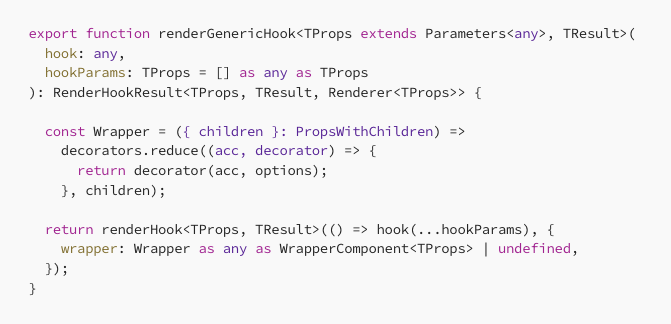
Add this in your test file:
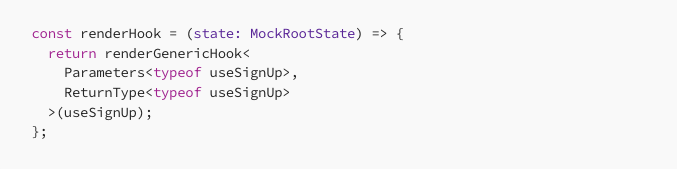
So now you have a strong typed function for testing your custom hook 🥳
I wish you all the best and good luck!